 Synthera Docs
Exodus requires a supported overlay. Use Medal or Discord.
The game must always run in Borderless or Windowed display mode. Fullscreen Exclusive is not supported.
Option 1 — Medal
Install Medal.
Run Medal as administrator.
Continue with the Exodus injection process.
For better in-game FPS, open Clip Settings and disable Capture Clips.
Option 2 — Discord
Install Discord.
Run Discord as administrator.
Open Discord settings and go to Game Overlay.
Enable Enable Overlay.
Keep Enable Legacy Overlay disabled.
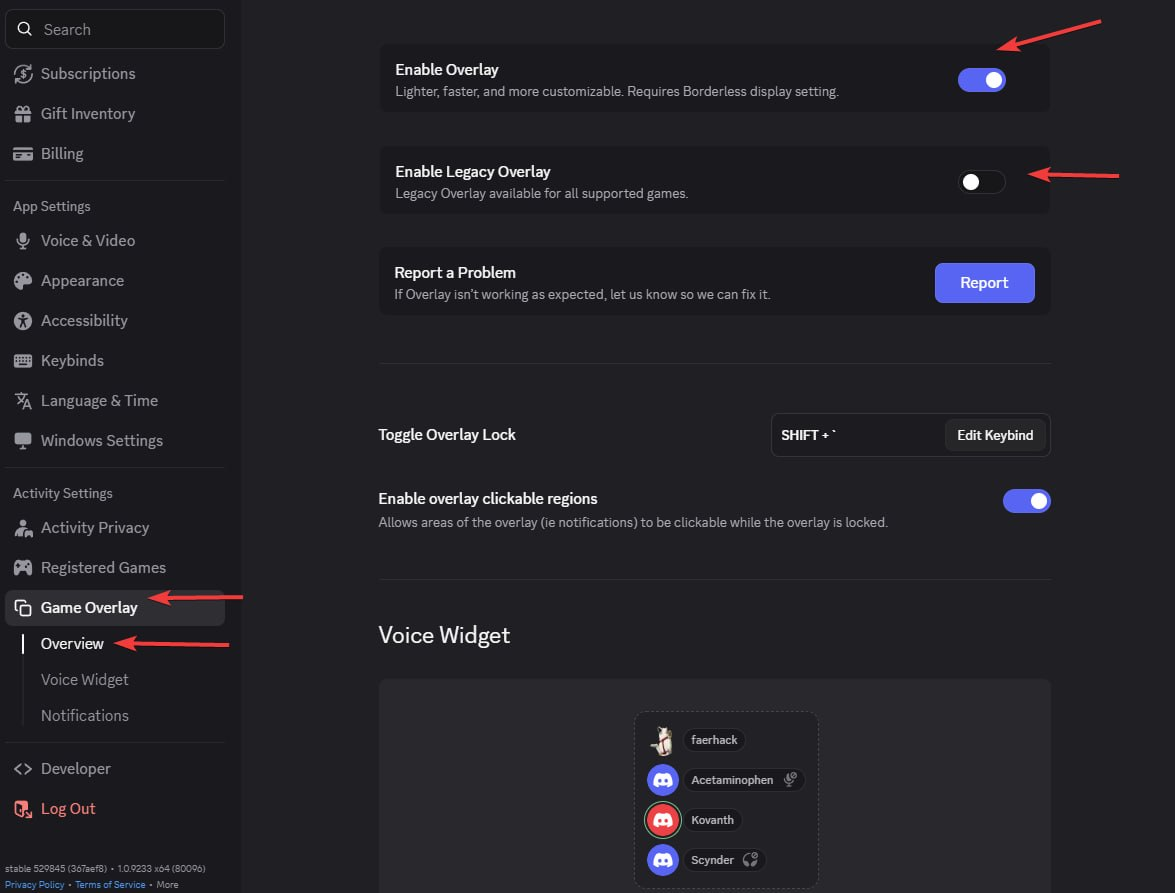
If Discord displays No suitable overlay, open the game's overlay settings and enable the per-game overlay option, as shown in the screenshot.

The game must remain in Borderless or Windowed mode.
Full setup guides: Medal Overlay Setup and Discord Overlay Setup.