 Synthera Docs
Некоторые античит-клиенты и сторонние защитные программы могут мешать запуску программы. Удаляйте их только в том случае, если это прямо указано в требованиях к вашему продукту.
Предупреждение
После удаления Riot Vanguard, FACEIT Anti-Cheat или аналогичных программ соответствующие игры могут не запускаться, пока нужный античит-клиент не будет установлен снова.
Открытие списка установленных приложений
Откройте меню Start (Пуск) в Windows.
Найдите Add or remove programs (Установка и удаление программ).
Откройте Add or remove programs (Установка и удаление программ) или Installed apps (Установленные приложения).
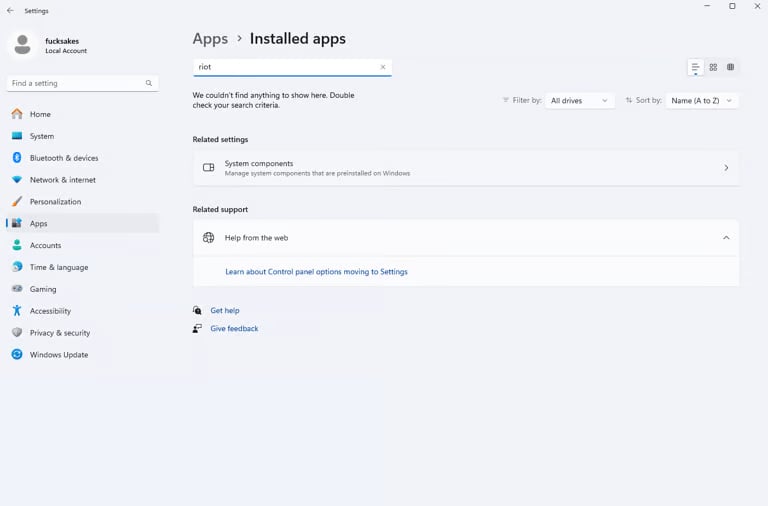
Проверка наличия конфликтующих программ
Воспользуйтесь полем поиска или просмотрите список вручную. Проверьте, не установлена ли какая-либо из следующих программ:
Riot Client
Riot Vanguard
FACEIT Anti-Cheat
ESEA Client
Сторонние антивирусы
Любая другая программа, прямо указанная как несовместимая в требованиях к продукту
Удаление конфликтующей программы
Найдите конфликтующую программу в разделе Installed apps (Установленные приложения).
Нажмите меню рядом с её названием.
Выберите Uninstall (Удалить).
Следуйте инструкциям на экране.
После удаления нужных программ перезагрузите компьютер.
Примечание
Удаляйте только программы, указанные как несовместимые с вашим конкретным продуктом. Riot Vanguard, FACEIT Anti-Cheat и другие нужные клиенты можно позже установить снова из официальных источников.