 Synthera Docs
Algunos clientes anti-cheat y programas de seguridad de terceros pueden impedir que el software se inicie. Elimínalos solo cuando los requisitos de tu producto te lo indiquen expresamente.
Advertencia
Eliminar Riot Vanguard, FACEIT Anti-Cheat o software similar puede impedir que se inicien los juegos compatibles hasta que vuelvas a instalar el cliente anti-cheat necesario.
Abre Aplicaciones instaladas
Abre el menú Start (Inicio) de Windows.
Busca Add or remove programs (Agregar o quitar programas).
Abre Add or remove programs (Agregar o quitar programas) o Installed apps (Aplicaciones instaladas).
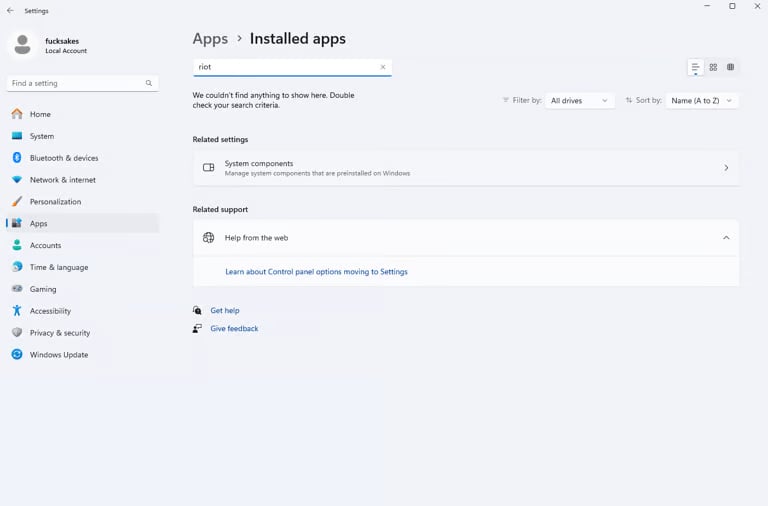
Busca programas en conflicto
Usa el campo de búsqueda o revisa la lista manualmente. Comprueba si está instalado alguno de los siguientes programas:
Riot Client
Riot Vanguard
FACEIT Anti-Cheat
ESEA Client
Software antivirus de terceros
Cualquier otro programa que figure expresamente como incompatible en los requisitos del producto
Desinstala un programa en conflicto
Busca el programa en conflicto en Installed apps (Aplicaciones instaladas).
Haz clic en el menú situado junto a su nombre.
Selecciona Uninstall (Desinstalar).
Sigue las instrucciones en pantalla.
Reinicia el equipo después de eliminar los programas necesarios.
Nota
Desinstala únicamente los programas que figuren como incompatibles con tu producto concreto. Más adelante puedes volver a instalar Riot Vanguard, FACEIT Anti-Cheat u otros clientes necesarios desde sus fuentes oficiales.