 Synthera Docs
Einige Produkte verwenden das NVIDIA Overlay, um ihr Menü anzuzeigen. Folge dieser Anleitung nur, wenn deine Produktanleitung NVIDIA als erforderliches Overlay nennt.
Hinweis
Dieses Overlay erfordert eine unterstützte NVIDIA-Grafikkarte.
Die NVIDIA App installieren
Lade die NVIDIA App von der offiziellen NVIDIA-Website herunter:
Öffne das heruntergeladene Installationsprogramm.
Folge den Anweisungen auf dem Bildschirm, um die App zu installieren.
Die Ersteinrichtung abschließen
Öffne die NVIDIA App.
Schließe die Bildschirme der Ersteinrichtung ab oder überspringe sie.
Warte, bis sich das Hauptfenster der NVIDIA App öffnet.
NVIDIA Overlay aktivieren
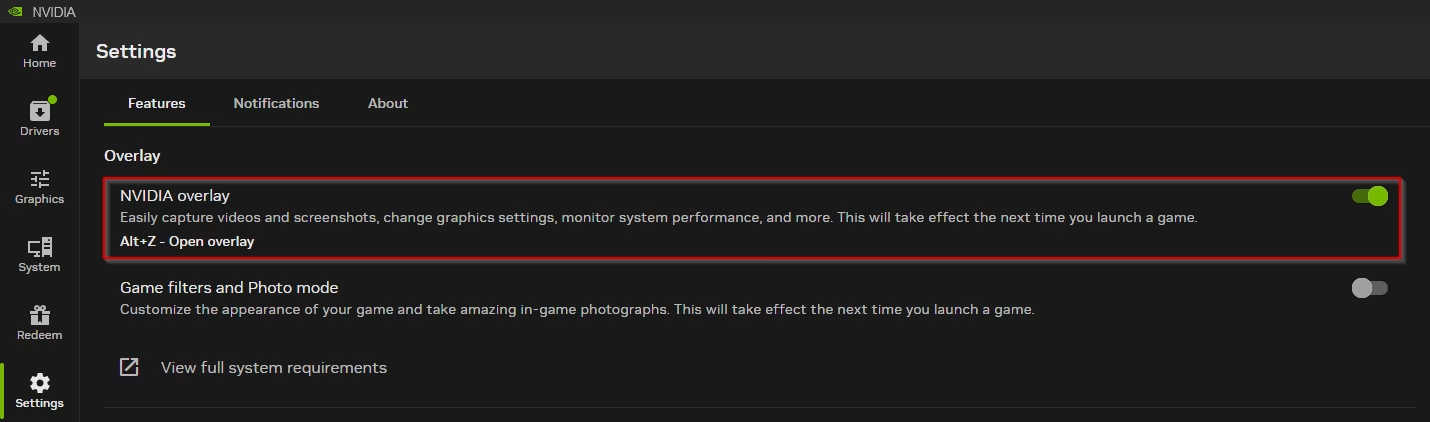
Öffne in der NVIDIA App Settings.
Suche NVIDIA overlay.
Schalte die Einstellung ein.
Das NVIDIA Overlay initialisieren
Lass die NVIDIA App laufen.
Öffne den Loader des Produkts.
Klicke im Loader auf Load.
Warnung
Wenn der Loader meldet, dass das Overlay nicht initialisiert ist, schalte NVIDIA overlay aus und wieder ein. Versuche danach erneut, das Produkt zu laden.